


Image search techniques are methods used to find images or information online — using text, a photo, or AI-powered tools. There are four main types: keyword-based search, reverse image search, visual similarity search, and AI-powered recognition. Each method works differently and is useful in different situations. Whether you want to find where an image came from, identify an object in a photo, or discover similar products — there is a specific technique for every need.
What Are Image Search Techniques?
Not too long ago, finding an image meant typing keywords into Google and hoping for the best.
That is no longer the case.
Today, image search techniques go far beyond text. You can upload a photo, point your camera at an object, or describe a mood — and search engines will find relevant images in seconds. With the rise of artificial intelligence, machine learning, and computer vision, these methods now allow systems to “see” and understand images the way humans do.
This guide covers every major technique, how they work, and which one you should use — and when.
The 4 Main Types of Image Search Techniques

1. Keyword-Based Image Search
This is the most common method. You type a word or phrase into a search engine, and it returns matching images.
But the engine is not actually “looking” at the images. It relies on alt text, file names, captions, nearby paragraphs, page titles, and structured data to understand what an image shows.
Best for:
- Finding stock photos or illustrations
- Content research and inspiration
- SEO-driven image traffic
Pro tips that actually work:
- Add color or style words: “minimalist white kitchen interior” beats “kitchen.”
- Filter by license type (Creative Commons) to avoid copyright issues
- Use file type filters:
filetype:jpgorfiletype:pngin Google
2. Reverse Image Search
Reverse image search flips the process. Instead of typing words, you upload an image — and the engine finds where it appears online.
When a user uploads a photo, advanced algorithms transform it into a mathematical representation, enabling comparison against massive image databases.
Who uses it and why:
| User | Why They Use It |
|---|---|
| Marketers | Check if competitors copied their visuals |
| Journalists | Verify if an image is real or manipulated |
| Photographers | Track unauthorized use of their work |
| SEOs | Find unlinked brand mentions for backlink building |
| Shoppers | Identify unknown products from a photo |
Reverse image search is not just for curiosity — professionals use it daily. You can upload your original images and find websites using them without attribution, then request a backlink — one of the highest-quality white-hat link strategies.
3. AI-Powered Visual Recognition
This is where things get really interesting in 2026.
Tools like Google Lens do not just find an image. They understand what is inside it. Google Lens acts as an assistant capable of extracting text (OCR), translating signs in real-time, and identifying objects, plants, or products for comparative shopping — all connected to Google’s immense database.
The biggest 2026 upgrade? Google Lens and Circle to Search can now search multiple objects within a single image simultaneously. If you use Circle to Search on Android to search an entire outfit, you will see results for every component of the look — not just one piece at a time.
Real-world uses:
- Point your phone at a plant → identify the species
- Scan a restaurant menu in another language → get it translated instantly
- Photograph a piece of furniture → find where to buy it
4. Visual Similarity Search
This technique goes beyond finding an exact image. It finds images that look similar — in color, shape, composition, or style.
Deep learning models capture nuanced features that mirror human perception, and advanced search engines can detect specific objects or faces in images to let users refine results based on those features.
Pinterest is the best consumer example of this. Upload a photo of a living room you like, and Pinterest returns hundreds of similar aesthetic pins.
How Image Search Actually Works (Simple Explanation)
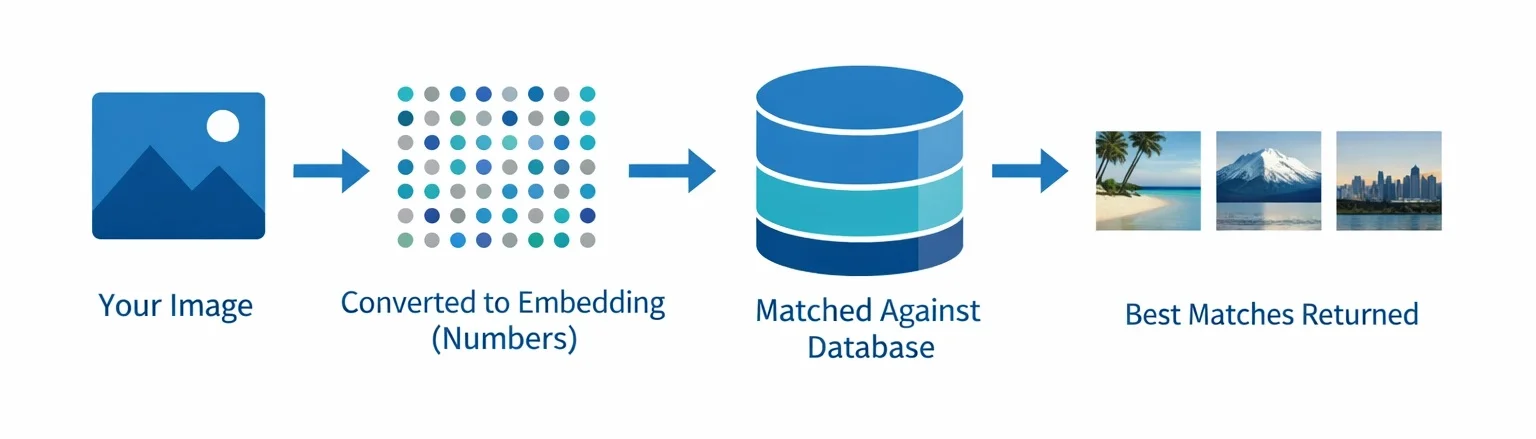
You do not need to be a developer to understand this. Here is a plain-English breakdown.
Step 1: Feature Extraction
When you upload an image, the search engine converts it into numbers. These numbers are called embeddings — they capture colors, shapes, textures, and objects in the image.
Step 2: Indexing
These numbers are stored in a large database. Algorithms like FAISS organize them so they can be compared quickly — even across billions of images.
Step 3: Matching
The system compares your image’s numbers to those of others in the database. The closer the numbers, the more visually similar the images.
What technology powers this?
| Technology | What It Does | Used In |
|---|---|---|
| SIFT / SURF | Detects edges and corners in an image | Older image matching systems |
| CNN (ResNet, VGG) | Extracts deep visual features using neural networks | Google Images, e-commerce |
| Vision Transformer (ViT) | Understands global image relationships | Modern AI search engines |
| CLIP | Connects image features with text descriptions | Multimodal search, AI tools |
Older techniques like SIFT helped identify local features, but modern deep learning models — including Vision Transformers — provide richer semantic representations that understand context, not just pixels.
Best Image Search Tools in 2026
| Tool | Best For | Free? | Platform |
|---|---|---|---|
| Google Images / Lens | General search, object recognition, OCR | Free | Web + Mobile |
| TinEye | Finding stolen or duplicate images | Free (basic) | Web |
| Bing Visual Search | Object identification, shopping | Free | Web + App |
| Pinterest Visual Search | Style, home décor, aesthetic inspiration | Free | Web + App |
| Yandex Images | Facial similarity, global database | Free | Web |
| Getty Images | Copyright verification of stock photos | Free (search) | Web |
| Reversely.ai | AI-powered reverse search with detailed source info | Freemium | Web |
Important: No single tool covers the entire internet. Always use at least two tools — no single engine has full web coverage.
When to Use Which Technique
Not sure which method fits your situation? Use this quick guide:
“I found an image and want to know its source” → Use Reverse Image Search (Google Images or TinEye)
“I want images for my blog post or article” → Use Keyword-Based Search with license filters
“I see something in real life and want to identify it” → Use Google Lens or Pinterest Lens
“I want to check if someone copied my photos” → Use TinEye or Google Reverse Image Search
“I want to find visually similar products online” → Use Pinterest Visual Search or Bing Visual Search
“I’m a developer building an image search feature” → Use CNN Embeddings or CLIP with a vector database
Tips to Get Better Results From Any Image Search
These work across all tools and techniques:
1. Crop before you search → If you want to find a specific person or product in a group photo, crop the image tightly around that subject before uploading. This gives the engine a cleaner signal.
2. Use high-quality images → Use high-quality images with clear subject focus. Small crops or major edits can reduce match accuracy significantly.
3. Combine text and image search → Layering methods ensure faster, more precise results. Use keyword filters on top of a reverse image search to narrow down results.
4. Try multiple engines → Google, Bing, and Yandex all have different databases. Running the same image across two or three tools gives you broader and more accurate coverage.
5. Filter smartly → Use filters for color, image size, date, and usage rights. This is especially important if you need legally usable images for commercial projects.
FAQs

What are image search techniques?
Image search techniques are methods used to find images or information using visual input, text queries, or AI tools. The four main types are keyword-based search, reverse image search, visual similarity search, and AI-powered recognition like Google Lens.
How does reverse image search work?
You upload an image or paste its URL into a search engine. The tool converts the image into a mathematical representation and compares it against its database to find matching or similar images and their sources.
Which image search technique is most accurate?
AI-powered tools like Google Lens are currently the most accurate for identifying real-world objects. For finding stolen or duplicate images, TinEye is the most reliable.
Can image search read text inside a photo?
Yes. Modern tools use OCR (Optical Character Recognition) to detect and read text found inside images, screenshots, signs, and documents.
Is image search useful for SEO?
Absolutely. Image search is an underused traffic channel. Google treats images as supporting evidence for content quality, and optimizing them strengthens E-E-A-T signals.
What is the difference between reverse image search and visual similarity search?
Reverse image search finds the same image and its source. Visual similarity search finds images that look similar — same style, color, or composition — without being identical.
Final Thoughts
Image search techniques have gone from a novelty to a core digital skill.
In 2026, you are not limited to typing keywords. You can point a camera at anything, upload any photo, or describe a visual concept — and search engines powered by AI, deep learning, and multimodal models will understand what you mean.
Search engines are moving toward a deeper understanding of context, enabling queries like “show me images that convey joy in outdoor settings” — an evolution that will redefine visual discovery in the years ahead.
Whether you are a marketer, a researcher, a photographer, or just curious — the right image search technique will save you time, protect your work, and open up possibilities that text search simply cannot.