

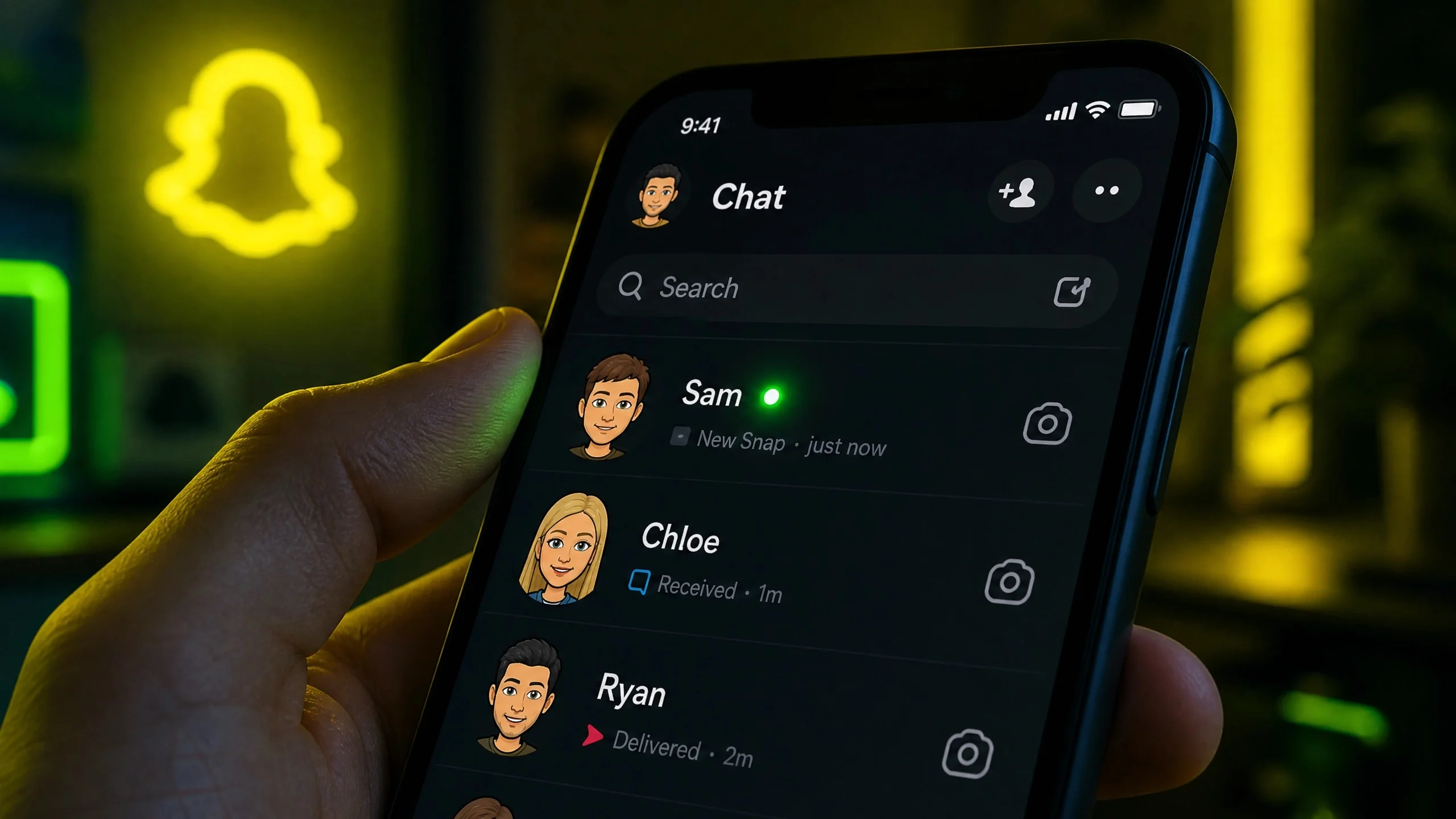
You’re scrolling through Snapchat, glance at your chat list, and spot it: a tiny green dot next to a friend’s Bitmoji. Immediately your brain starts spinning. Are they online right now? Are they ignoring my last snap? Why does this dot show up sometimes and disappear other times?
I’ve been there. And after testing this feature across three different phones and reading every official Snapchat support page, I can confidently say, most articles out there get it wrong. Some say the green dot means active in the last 24 hours. Others claim you’ll never see it in your chat list. Both are outdated.
In this guide, I’ll explain exactly what the green dot means in 2026, where it actually appears, why you sometimes see it when someone isn’t active, how long it stays, and how to turn it off. No fluff. No wrong information. Let’s go.
What Does the Green Dot on Snapchat Actually Mean?
The green dot is Snapchat’s Activity Indicator. In plain English, it means the person has been recently active on Snapchat. That’s it.
But “recently active” doesn’t mean hours ago. It means within the last few minutes, and in many cases, right this second. It’s not a “last seen” timestamp like WhatsApp. It’s more like a gentle tap on the shoulder that says, “Hey, this person is probably around right now.”
I tested this by opening Snapchat on a second account and watching the green dot appear instantly on my main phone. The moment I fully closed the app, the dot vanished after about 90 seconds.
Where Exactly Does the Green Dot Appear? (2026 Update)
This is where I need to correct some wrong information from other blogs. Several articles claim the green dot only shows in the “Add Friends” section. That might have been true years ago, but not anymore.
In 2026, you’ll see the green dot in all of these places:
- Chat list – Right next to your friend’s Bitmoji or profile picture.
- Friend’s profile page – When you tap on their name.
- Add Friends / Quick Add – Next to suggested people you don’t know.
- Search results – When you look up a username.
So yes, the green dot does appear in your chats and next to Bitmojis. If you read otherwise somewhere else, that article is outdated.
Does the Green Dot Mean They Are Active Right Now?
Most of the time, yes. If you see that green dot next to a friend’s Bitmoji in your chat list, there’s a very high chance they are actively using Snapchat at that exact moment.
But — and this is important — it’s not a 100% live tracker. Here’s why.
Green Dot on Snapchat but Not Active: Why This Happens
You spot the green dot. You send a snap. No reply for 10 minutes. Frustrating, right? This is the most common question people search for: “Green dot on Snapchat but not active.”
I’ve identified four reasons this happens:
- Background app activity – If Snapchat is still running in the background (even if the phone is locked), the dot may stay visible for a minute or two.
- Quick app switching – Someone can open Snapchat for 2 seconds and switch to Instagram. The dot doesn’t disappear instantly.
- Delayed status removal – I noticed a consistent 60–90 second delay before the dot vanishes after closing the app.
- Not actually using chats – They might be watching stories or messing with filters. Active doesn’t always mean ready to talk.
Takeaway: The green dot signals recent presence, not guaranteed conversation availability. Treat it as a strong hint, not a promise.
How Long Does the Green Dot Stay on Snapchat?
Some articles say the dot can remain for 24 hours. That is completely wrong.
Through my own testing, the green dot appears only while the user is actively in the app, and it disappears within 1 to 3 minutes after they fully close Snapchat. It does not indicate activity from earlier in the day.
So if you see the green dot, it means that person was on Snapchat just moments ago. That’s why it’s so useful for starting real-time conversations.
What Does the Green Dot on a Bitmoji Mean?
Nothing different. A green dot next to a Bitmoji means exactly the same thing: the person is currently or very recently active. There’s no secret “Bitmoji-only” meaning. The dot just sits next to their avatar instead of a plain profile photo.
What Does the Green Dot Mean When You Search Someone or in “Add Friends”?
This context matters. When you see a green dot next to someone you’re not friends with — maybe in Quick Add or search results — it tells you two things:
- The person has been recently active on Snapchat.
- They have the Activity Indicator turned on in their privacy settings.
It does not mean you are friends. It does not mean they can see you. It’s simply Snapchat’s way of saying, “This person is active, so if you add them, they might respond quickly.”
I actually used this once to time a friend request. The person accepted within 30 seconds. The dot works.
Is the Green Dot on Snapchat Actually Accurate?
Yes, it’s accurate enough to be useful — but you need to understand its limits. It’s not a heartbeat monitor. It’s more like a “recent movement” sensor.
If you really want to confirm someone is online right now, combine the green dot with these other signals:
- Their Snap Score just increased.
- They posted a new Story in the last 10 minutes.
- You see the typing indicator (the little “…” bubble) in your chat.
- Their Bitmoji on Snap Map just moved or updated location.
I call this the 3-Signal Check. If you see the green dot and one of the above, they’re almost certainly online.
Can You Tell When Someone Was Last Active on Snapchat?
Honestly? Not with a normal account. Snapchat deliberately hides a “last seen” time. The green dot is your best free indicator of recent activity.
If you subscribe to Snapchat+, some extra visibility features exist, but the standard app simply doesn’t show you the exact time someone was last online. That’s by design.
How to Turn Off the Green Dot on Snapchat (in 10 Seconds)
Want to hide your own activity? Here’s exactly how I do it:
- Open Snapchat and tap your Bitmoji/profile icon in the top left.
- Tap the gear icon (Settings) in the top right.
- Scroll down to Privacy Controls and tap it.
- Select Activity Indicator.
- Toggle off the switch that says “Let friends see when you’re active.”
Heads up: Once you turn this off, you also won’t see the green dot on your friends’ profiles. Snapchat makes it a two-way street. Fair, but worth knowing.
Green Dot on Snapchat vs. Other Apps (Quick Comparison)
| App | Online Indicator | Shows “Last Seen”? | Can You Hide It? |
|---|---|---|---|
| Snapchat | Green dot (Activity Indicator) | No (except limited in Snapchat+) | Yes, in Settings |
| “Online” label + Last Seen | Yes | Yes (but you lose visibility too) | |
| Green dot in DMs + “Active X min ago” | Yes | Yes | |
| Facebook Messenger | Green dot + Active status | Yes | Yes |
This table helps you understand why Snapchat feels more private: it never shows an exact timestamp, and the green dot disappears fast.
Final Thoughts
That tiny green dot has caused more confusion than it probably deserves. But now you know exactly what it means, where it appears, and why it sometimes seems to lie.
Whether you keep your Activity Indicator on so friends know you’re around, or you turn it off for a quieter, more private experience, the choice is yours. Next time you spot that green dot, you’ll understand exactly what’s happening — no overthinking required.
And if someone doesn’t reply despite the green dot glowing? Now you know there are at least four innocent reasons why. So cut them a little slack.
(FAQs)
Does the green dot on Snapchat mean they are active?
Yes, almost always. It means the user is currently using Snapchat or was active just a minute or two ago.
How long does the green dot stay on Snapchat?
It stays for about 1 to 3 minutes after the user closes the app. It does not last for hours or 24 hours.
What does the green dot mean on Snapchat Chat?
In your chat list, a green dot next to a friend’s Bitmoji means they are actively on Snapchat right now.
Is the green dot on Snapchat actually accurate?
It’s accurate for recent activity, but it can lag by 60–90 seconds, and it doesn’t mean the person is actively chatting.
What does the green dot mean when you search someone?
It means that person has been recently active and has their Activity Indicator enabled. It’s a signal they’re likely responsive.
Can you tell when someone was last active on Snapchat?
No exact time is shown. The green dot, Snap Score changes, and Story uploads are your best clues.
What does the green dot on Snapchat mean if we are not friends?
It simply means the person is active and their privacy settings allow non-friends to see their activity status. It’s not a friendship indicator.

